Northgate Platform Solutions

Turn the spreadsheet everyone emails around into an app they like using.

Northgate builds custom apps and automations for law firms and growing businesses, on the Microsoft 365 you already pay for. Your people get one clear screen instead of five spreadsheets, and the reminders, approvals and reports run on their own.

Year-end collections forecast
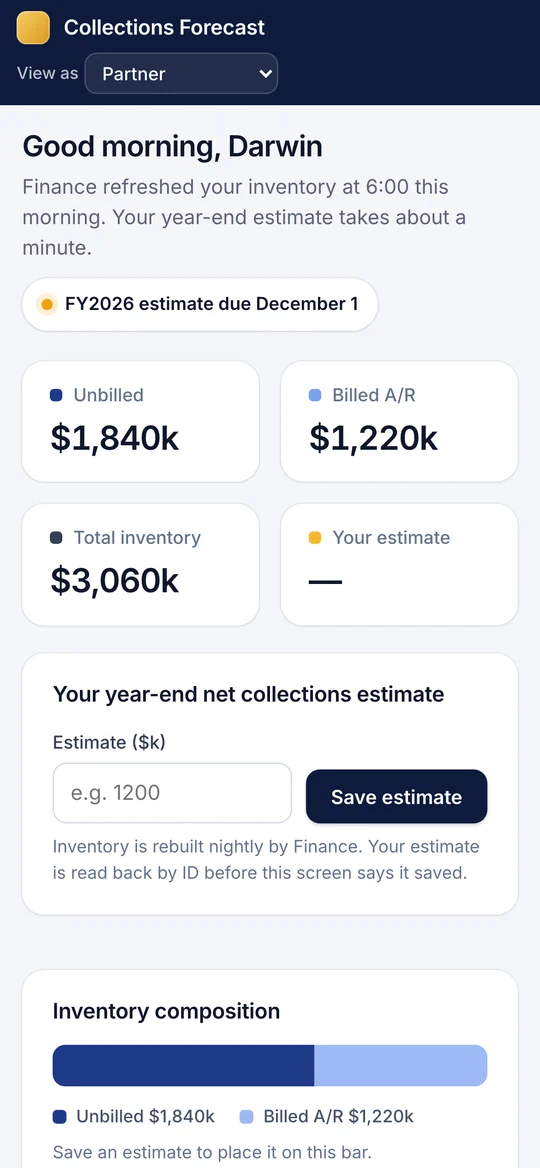
A collections forecasting app built for a law firm, shown with sample data
The same app on a phone
Reminder sent automatically88 people who haven't responded got their second notice.Today, 4:30 PM
Built for a 2,000-person law firmBuilding on Microsoft's platform since 2018Works on desktop and phoneYou own everything we build

Apps we have built

Each one replaced a spreadsheet, an email chain or a paper form. Every app here is a working copy you can click through, rebuilt with made-up names and numbers, because the originals belong to the organizations we built them for.

Not a law firm? The same building blocks cover what most growing businesses still run on spreadsheets: job and project tracking, purchase approvals, new-hire setup, inspections and service requests.

Law firm · Finance

Year-end collections forecast

Before: Several hundred partners, a spreadsheet passed around by email, and weeks of chasing replies.

  • Each partner sees their own numbers and enters an estimate in about a minute, on a laptop or a phone.
  • Department heads see their team, and can fill in for a partner who is traveling.
  • Reminders go out on a schedule, and leadership gets a progress email every weekday morning.
Year-end collections forecast
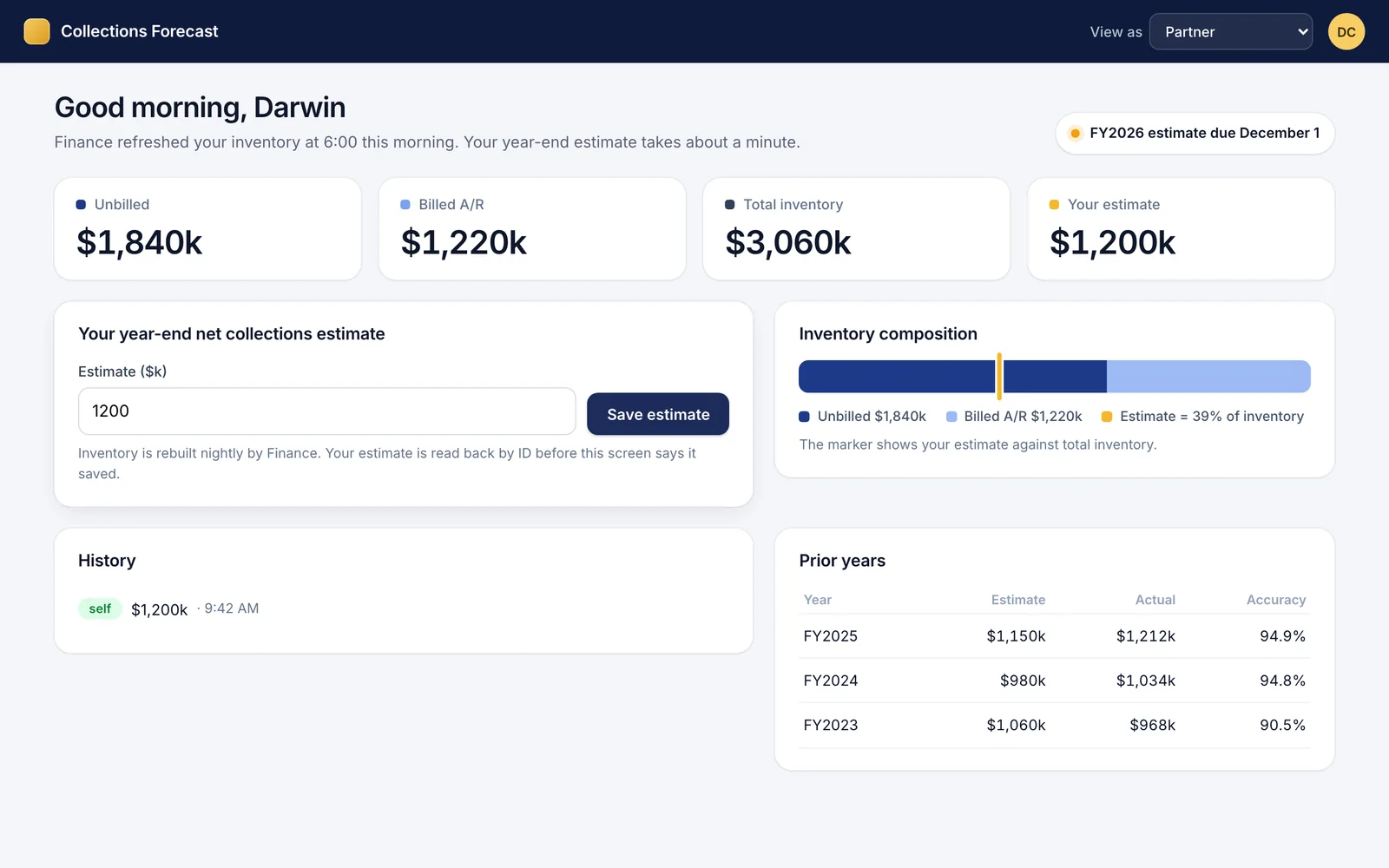
The Year-end collections forecast app on a laptop, with sample data
The same app on a phone
Law firm · Billing

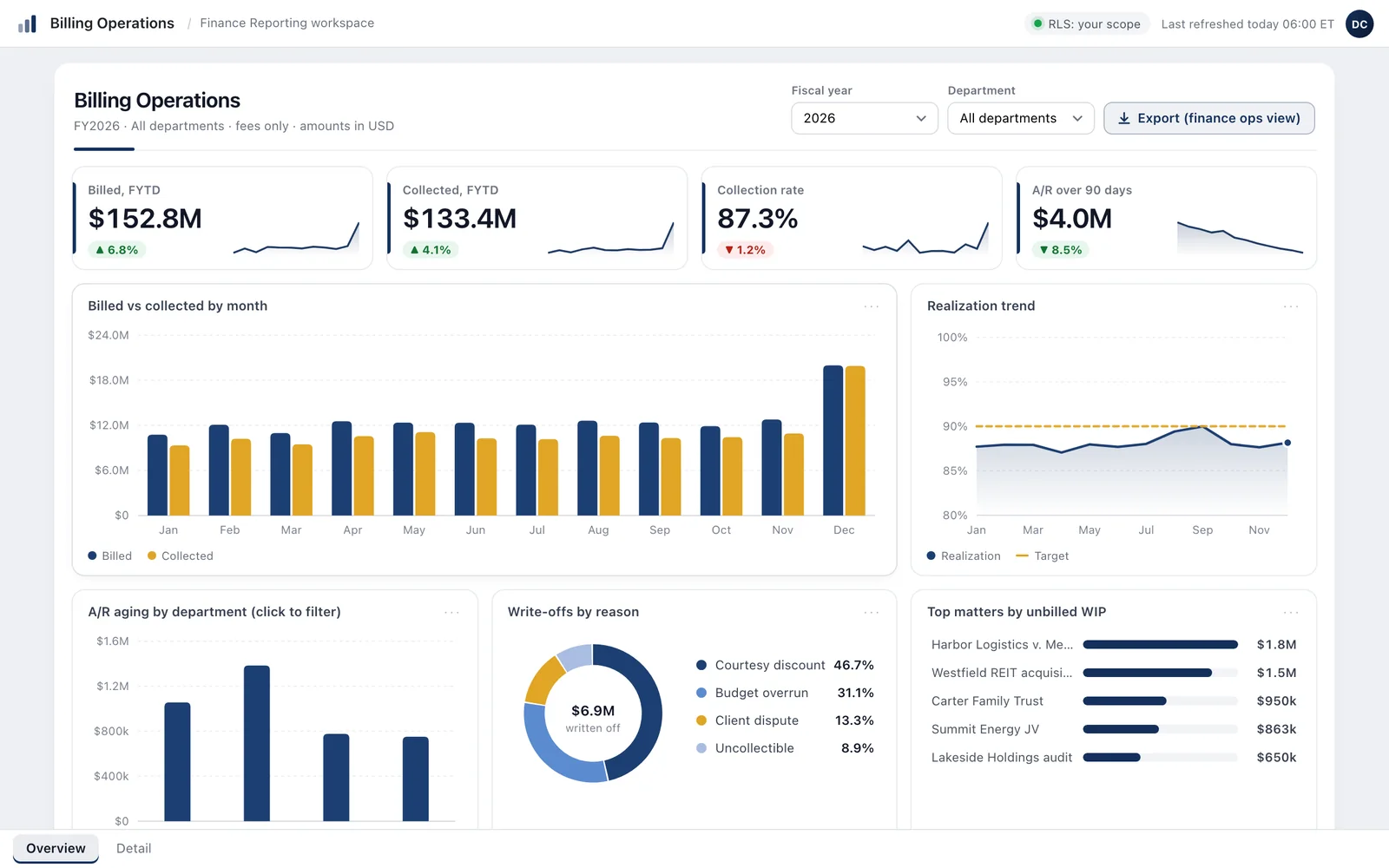
Billing dashboard for firm leadership

Before: A monthly report stitched together by hand from three sources. It took most of a week and never matched last month.

  • One report, ready on the second business day of the month.
  • The same numbers for everyone, because every figure is defined once.
  • Department heads see their own department without a second report.
Billing dashboard for firm leadership
Screenshot of the Billing dashboard for firm leadership app with sample data
Law firm · Operations

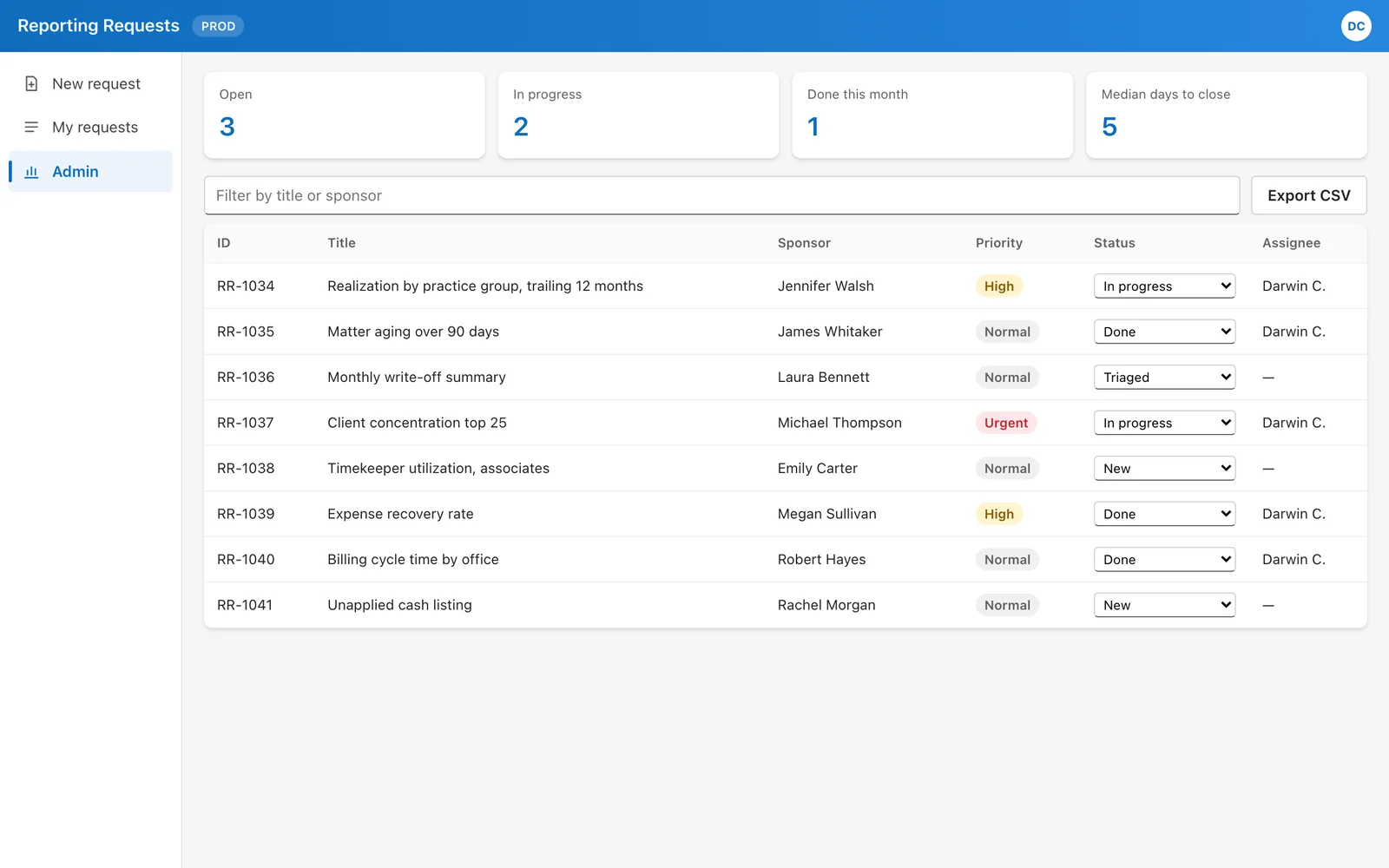
A request portal for an internal team

Before: Requests arrived by email and hallway conversation. Who asked for what lived in people's heads.

  • People submit a request with attachments, and the person approving it gets an email with a link.
  • The team sees every open request, its priority and who is on it.
  • The team sees how long requests take to close, and can export the list for any meeting.
A request portal for an internal team
Screenshot of the A request portal for an internal team app with sample data
Representative build · Public works

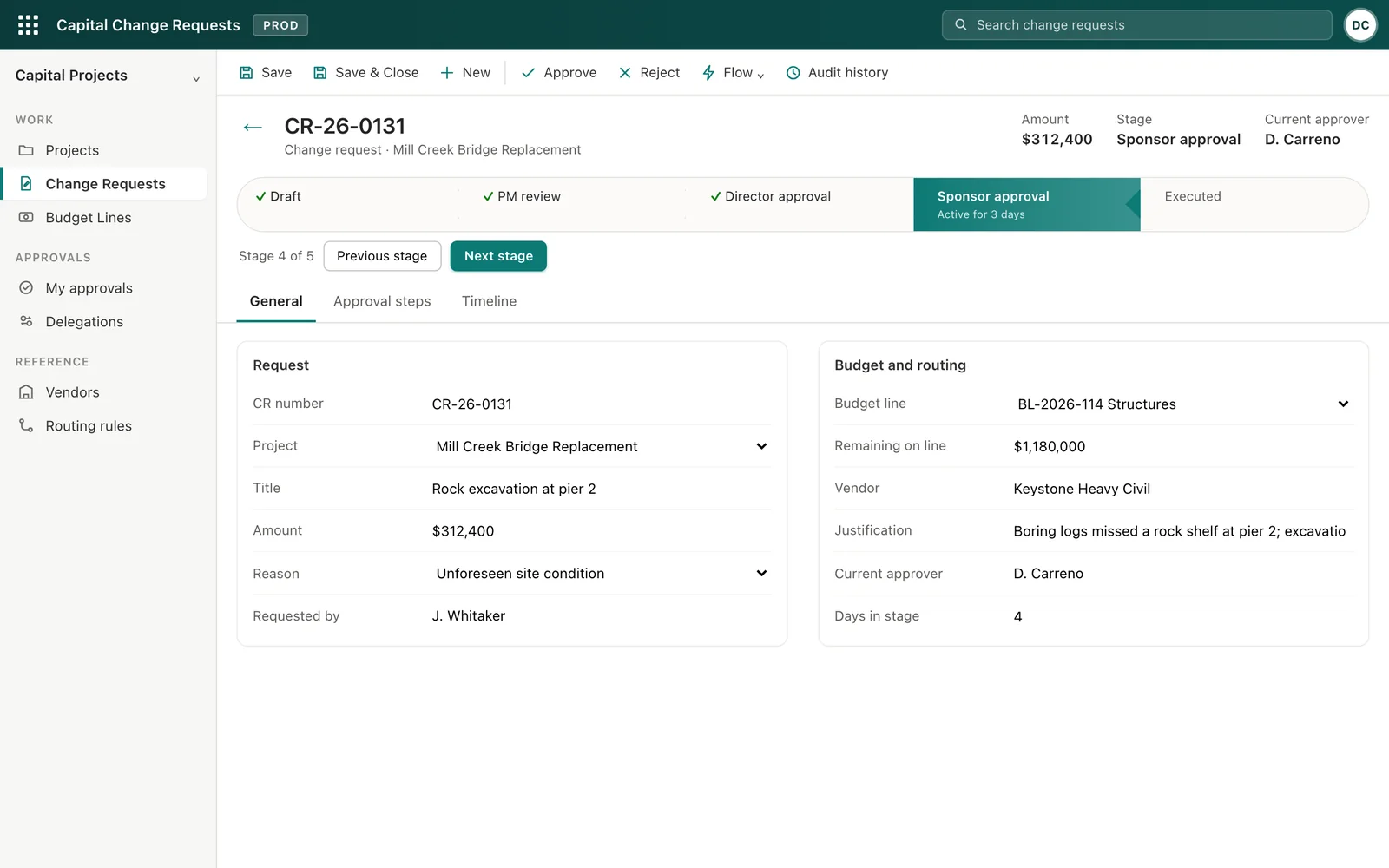
Approvals that route themselves

Before: Change orders approved by email chain. Nobody was sure who had to sign what, and approvals stalled whenever someone was out.

  • The amount decides who approves. Bigger requests go higher, automatically.
  • When an approver is out, their deputy gets it instead of an inbox nobody reads.
  • Every decision is recorded, so an audit question takes a minute, not a week.
Approvals that route themselves
Screenshot of the Approvals that route themselves app with sample data
Representative build · Field crews

Phone apps for people in the field

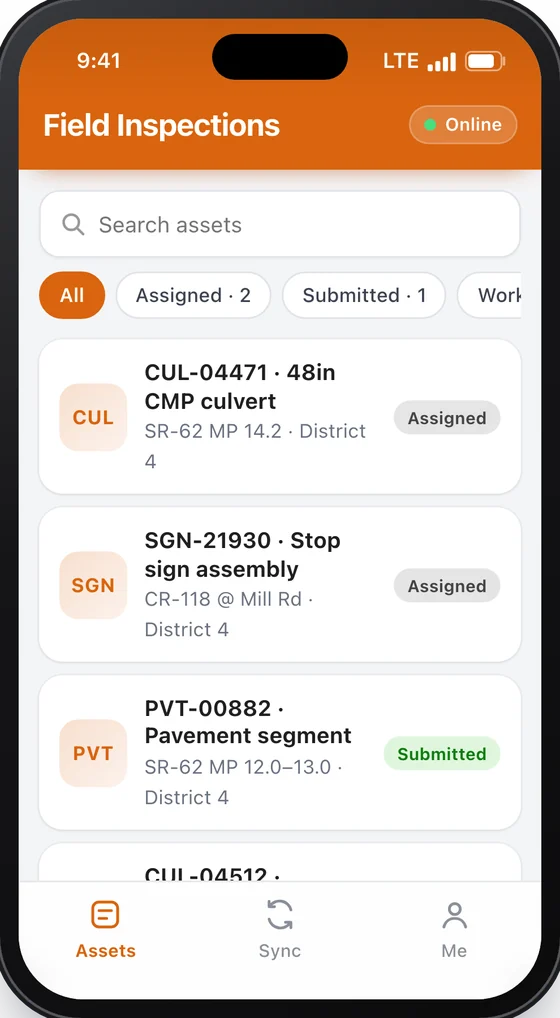
Before: Paper forms, photos on personal phones, and everything typed in days later. Some of it never made it in.

  • Crews fill it in on the spot, with photos and location attached.
  • It works with no signal and sends everything once the phone is back in range.
  • A failing rating creates the follow-up job on its own, so nothing waits on a person to notice.
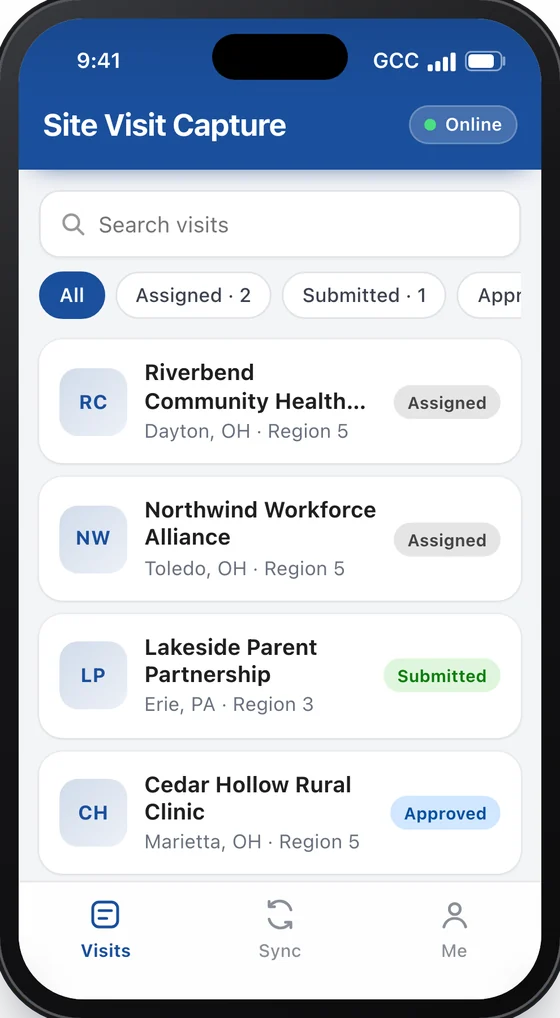
Field inspections app on a phone, with sample dataSite visit app on a phone, with sample data
Representative build · Client files

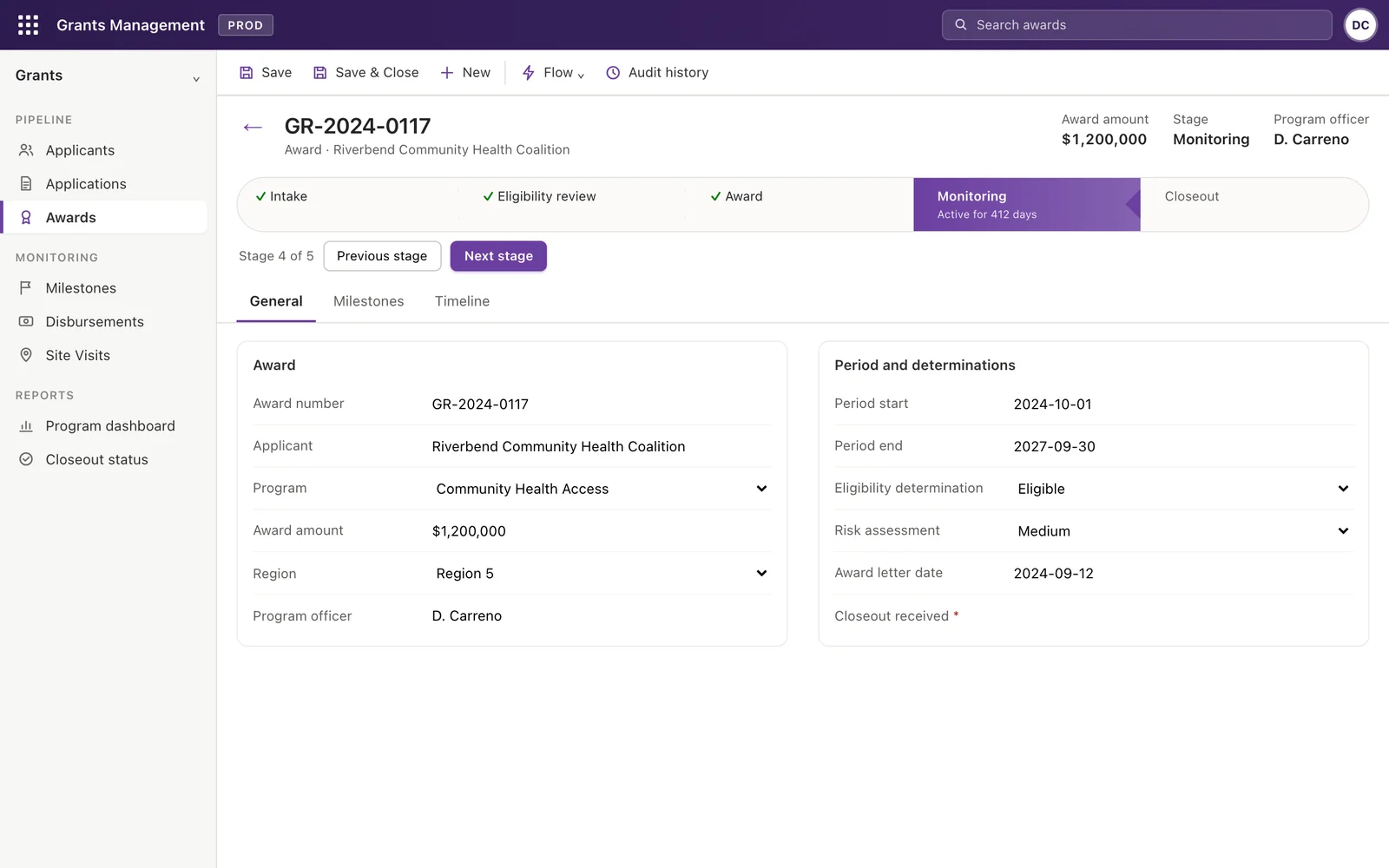
One place for every file, from first contact to final sign-off

Before: An old database, a shared drive of letters and a spreadsheet per person. Every status question meant a phone call.

  • Each file shows exactly what stage it is in and what happens next.
  • Everyone works from the same record instead of their own copy.
  • The full history is kept, so nobody has to rebuild what happened from email.
One place for every file, from first contact to final sign-off
Screenshot of the One place for every file, from first contact to final sign-off app with sample data

Apps marked as representative builds are based on our work for public-sector clients, with the agency and the figures changed. See all twelve, with technical write-ups

The follow-up happens without anyone remembering to do it.

A lot of every week goes to chasing: reminders, approvals, status updates and the Monday report. We build the automations that do it on schedule, and send each person only what they need.

A day of messages from systems we have built. Names and numbers are made up.
  1. CFCollections ForecastOvernight

    Inventory refreshed for 300 partners

    Figures from the billing system are updated before anyone signs in. No one exports anything.

  2. CFCollections ForecastEmail to leadership

    212 of 300 partners have responded

    71% so far, 14 new since yesterday. Tax and Real Estate are furthest behind.

  3. ACAnnual CertificationEmail to a partner

    Your 2026 certification is due December 1

    One click from this email confirms it.

    Certify now
  4. CRChange RequestsApproval

    A $312,400 change order needs a director

    Anything over $250,000 goes to the director. The director is out today, so it went to the deputy.

    Review
  5. POPeople OperationsNew hire

    Setup started for a new hire starting Monday

    The welcome email, the setup tasks and the first-week checklist went out when HR added the record.

  6. CFCollections ForecastReminder

    Reminder sent to the 88 partners still pending

    Second notice, on the schedule finance set in September. Nobody had to remember to send it.

Built on what you already have

Your Microsoft 365, not a new vendor

Your people sign in with the account they already use. No new passwords and no new vendor to approve. Your IT team stays in control of who can see what.

Your data stays where it is

Everything runs inside your own Microsoft 365. We sign an NDA before we see anything, and none of your data goes to outside AI services.

You own all of it

The app, its source code and the written instructions are yours. Any qualified developer can maintain it after us.

Licensing, explained up front

Many apps run on the licenses you already have. Some need a Power Apps license, roughly $10 to $20 per user per month. We tell you which before you commit to anything.


Pricing

Fixed prices wherever the work can be scoped, agreed in writing before anything starts.

A free first call

Free30 minutes

Tell us how the work happens today. You leave knowing whether an app would help, even if the answer is no.

Discovery and plan

$6,500fixed · 2–3 weeks

Optional. For when several processes need fixing and you want to know which to do first. We sit with the people who do the work, map how it moves, and hand you a written plan: what to build first, what it costs to build and to run, and what to leave alone.

A custom app

from $9,500per app · fixed quote before work starts

Designed with your team and built in weeks, working on desktop and phone, with the automations around it.

Setup for more than one app

$14,000fixed · 4–6 weeks

Worth it once you plan two or more apps. Changes are tried on a test copy before your team sees them, every version can be rolled back, and access is set by role, documented so it survives staff changes.

Ongoing care

from $3,500per month · about two days of work · stop any time

Changes, fixes, new reports and a direct line when something breaks, with an answer within one business day.


How it works

A free call

Thirty minutes about the process that is costing your team time.

A fixed price, in writing

What we will build, what it will cost to build and to run, and when you will have it.

Working screens every week

You click through the real app as it grows, so there are no surprises at the end.

Handover, then care if you want it

Your team gets training and written instructions. Ongoing care is optional.

You work with Darwin directly

Northgate is the practice of Darwin Carreno, who has been building apps and automations on Microsoft's platform since 2018: for a small operations business, for federal programs at a Big Four advisory firm, leading a three-person team at a global engineering firm, and most recently as the platform architect for a 2,000-person US law firm, where the law-firm apps on this page were built.

The same person designs your app, builds it and hands it over, so nothing gets lost between a salesperson, a project manager and a developer. Every app ships documented for whoever looks after it next.

BasedSilver Spring, Maryland · remote, Eastern hours
CompanyNorthgate Platform Solutions LLC, founded 2026
LanguagesEnglish, Spanish, Portuguese

We are not technical. Is that a problem?

No. You describe how the work happens today and what gets in the way. We handle the technology and explain every choice in plain English.

How long does an app take?

Most take four to ten weeks, depending on how many other systems it has to talk to. The fixed quote gives you the date before work starts.

Will it work with our billing system and other software?

Usually. The collections app on this page reads figures that finance refreshes from the firm's billing system every night. On the first call we check how your systems share data, and tell you plainly if something can't connect.

Does it work on phones?

Yes. Apps work on desktop, tablet and phone, and apps for field crews keep working with no signal.

What happens after you hand it over?

You own it outright, and your team is trained on it. If you want us to keep improving it, ongoing care is a monthly plan you can stop at any time.

Is our data safe?

It never leaves your Microsoft 365. Each person sees only what their role allows, and every change is recorded. We sign an NDA before we see anything.

For Microsoft partners and staffing firmsCapability statement and rate card (PDF)

Tell us which spreadsheet you would like to never open again.

Send two or three sentences: what the process is, roughly how many people touch it, and what goes wrong. Darwin replies within one business day with times for a 30-minute call. No preparation and no sales deck.

darwin@northgateplatform.com
Call (771) 252-5690Hours Monday to Friday, Eastern time